Posts

A simple Python program that reads a textfile and creates 2-level folder structure based on the contents of the textfile

import os, sys # If directory (path) doesn’t exist, create it def createPath(path):    if not os.path.isdir(path):       os.mkdir(path) f = open(r"F:\Folders.txt") folder = "F:\\Documents\\" ## Read the first line line = f.readline() ## If the file is not empty keep reading line one at a time till the file is empty i=1 while line:     #print(line)     for char in '\n?.!/;:':        line = line.replace(char,'')     position = line.find("*")     if position == 0:       #print("line is {}" .format(line[1:]))       folder2 = folder + str(i) + "." + line[1:]       print(folder2)       createPath(folder2)       j=1       i=i+1     else:       if len(line.strip()) != 0:         folder3 = folder2 + "\\" + str(j) + "." + line       ...

Basic Skeleton for using the Facebook PHP SDK v.4.4.0

  <? session_start (); require_once ( ' Facebook/FacebookSession.php ' ); require_once ( ' Facebook/FacebookRedirectLoginHelper.php ' ); require_once ( ' Facebook/FacebookRequest.php ' ); require_once ( ' Facebook/FacebookResponse.php ' ); require_once ( ' Facebook/FacebookSDKException.php ' ); require_once ( ' Facebook/FacebookRequestException.php ' ); require_once ( ' Facebook/FacebookAuthorizationException.php ' ); require_once ( ' Facebook/GraphObject.php ' ); use Facebook\FacebookSession; use Facebook\FacebookRedirectLoginHelper; use Facebook\FacebookRequest; use Facebook\FacebookResponse; use Facebook\FacebookSDKException; use Facebook\FacebookRequestException; use Facebook\FacebookAuthorizationException; use Facebook\GraphObject; // init app with app id (APPID) and secret (SECRET) $appID = ' YOUR_APP_ID ' ; $appSecret = ' YOUR_APP_SECRET ' ; $appLoginURL = ' https:...

How to remove “Shared Folder Synchronization” from Windows 7 context menu

Image
Click “Start->Run->cmd” to open up a command prompt window Type the following commands in the command prompt cd C:\Program Files\Microsoft Office\Office14\ regsvr32 /u GROOVEEX.DLL You should see the above "success" message to inform you that the DLL has been unregistered and you should no longer see the "Git" menu items on your context menu Figure 1: Shared Folder Synchronization menu item still enabled Figure 2: Deregistering the GrooveEx.dll file Figure 3: Shared Folder Synchronization menu item no longer in context menu items Technorati Tags: Windows 7 , context menu , Shared Folder Synchronization , Groove

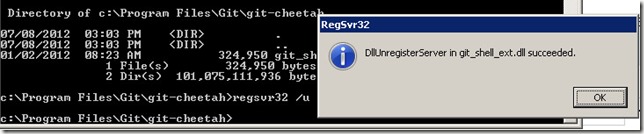
How to remove “Git” from Windows 7 context menu

Image
Click “Start->Run->cmd” to open up a command prompt window Type the following commands in the command prompt Technorati Tags: Git , Windows 7 , context menu You should see the above "success" message to inform you that the DLL has been unregistered and you should no longer see the "Git" menu items on your context menu

HOWTO in PHP: Retrieve a list of Facebook Pages you are the Administrator of using Graph API

Image
Here's the code. I am assuming here that you have already logged in as a valid Facebook user with the "manage_pages" scope permission. <?php require_once("fbphpsdk/facebook.php"); $config = array(); $config['appId'] = 'YOUR_APP_ID'; $config['secret'] = 'YOUR_APP_SECRET'; $config['fileUpload'] = false; // optional $facebook = new Facebook($config); $uid = $facebook->getUser(); $accesstoken = $facebook->getAccessToken(); $params = array('access_token' => $accesstoken); if ($uid) { try { $userprofile = $facebook->api('/me','GET'); echo "Name: " . $userprofile['name']; $accounts = $facebook->api('/me/accounts', 'GET', $params); foreach($accounts['data'] as $account) { echo "<hr/>" . $account['name'] . " " . $account['id'] . "<br/>...

How to get the Page ID of a Facebook Page from its username

Image
It is very easy Just type this in the addressbar of your browser and press enter. http://graph.facebook.com/<pageurl>/ E.g. when I type the following URL of my own Facebook Page, I yield the results as in Figure 1 below. http://graph.facebook.com/dorathetechplorer/ Hence, the Page ID of my page would be "157472464323620". Figure 1: Output from typing "http://graph.facebook.com/dorathetechplorer"

How to retrieve posts from Facebook Page using Facebook Graph API and php

Here's a simple php script that will split out the latest 100 posts from a given Facebook Page. Note that you will need to modify the code at lines 1 and 2 by: generating your own access token either using the oAuth dialog or via Facebook Graph API Explorer . specifying the page id of the target Facebook Page Have fun trying it out! :) <? $access_token="&access_token=YOUR_ACCESS_TOKEN_HERE"; $pageid="THE_PAGE_ID"; $graph_query_url="https://graph.facebook.com/" . $pageid . "?fields=posts.limit(100)" . $access_token; $graph_query_result = @file_get_contents($graph_query_url); $graph_query_obj = json_decode($graph_query_result,true); foreach($graph_query_obj[posts][data] as $p) { echo $p[from][name] . "<br/>"; if ($p[story]) echo $p[story] . "<br/>"; if ($p[message]) echo $p[message] . "<br/>"; if ($p[picture]) echo "<img src='" . $p[p...